Check a calculator result with a rough estimate
An estimate checks size, not the final digits.
Before exact calculation, estimate using convenient nearby numbers. A large discrepancy prompts a check of the input and operation. Agreement with the estimate does not prove the final digits or the entire entry correct.
What to do
- Choose suitable nearby numbers and record an approximate expectation before checking the exact result.
- Compare the result's size with the estimate; if they conflict, inspect entered numbers and the operation separately.
- Correct the discovered error, calculate again and retain the exact result separately from the estimate.
Example
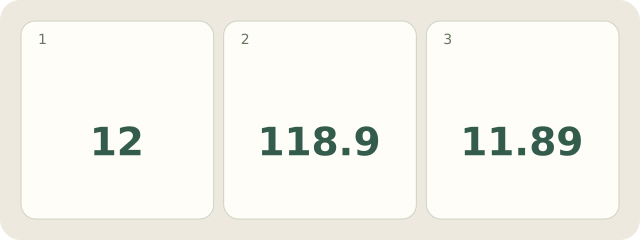
Fictional example: 2.9×4.1≈3×4=12. A result of 118.9 conflicts with the estimate. Checking the input reveals 29 instead of 2.9. Recalculation gives 2.9×4.1=11.89. The estimate exposed the scale error, but did not prove 11.89's digits.
My Day · Windows
My Day can hold the estimate, input error and checked answer. You perform the calculation.