01
For learning, at your pace
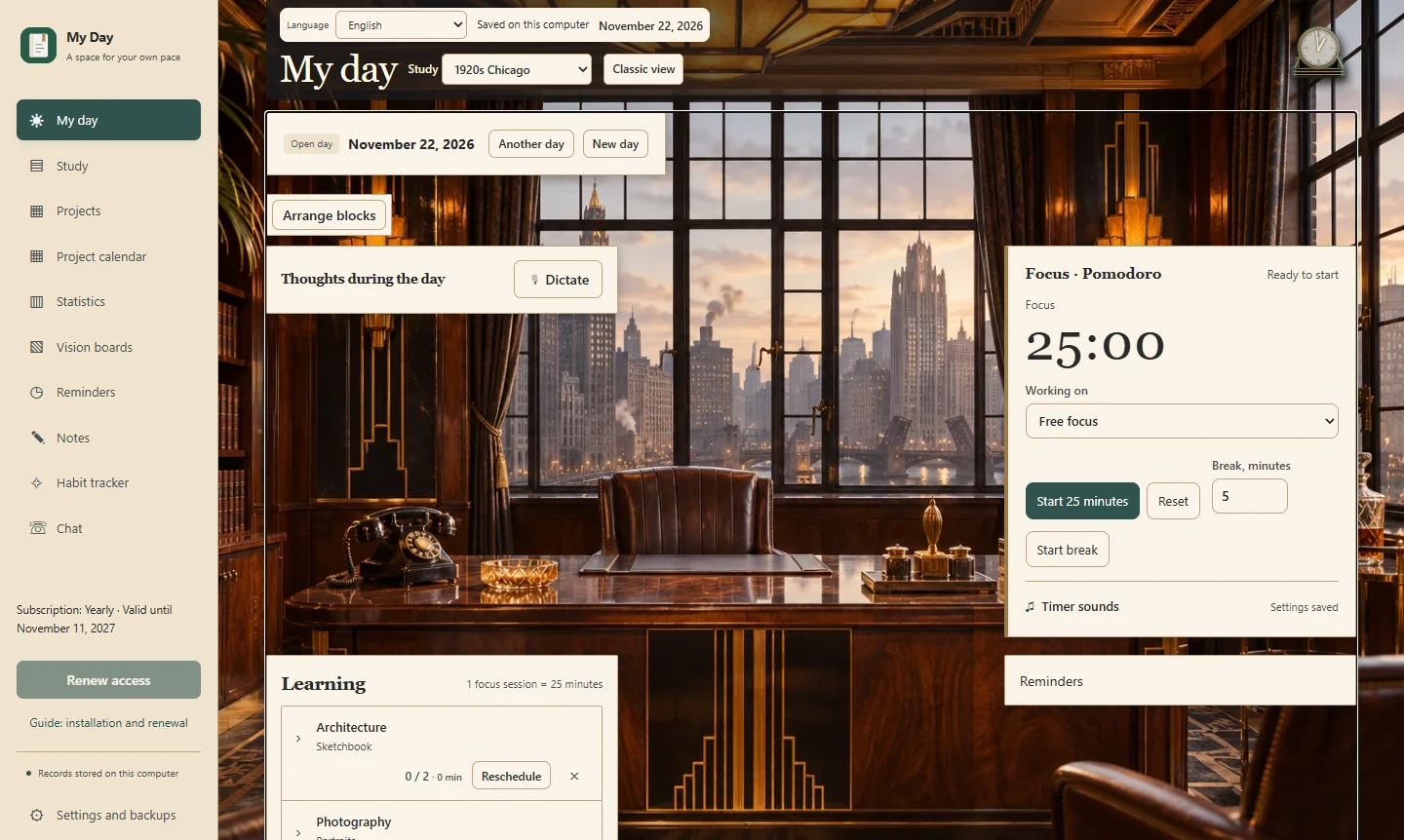
Keep subjects and courses together, record where you stopped, and plan a focused session when you have time.
✳YOUR DAY. ROOM TO LIVE.
Study, work, ideas and everyday things — together in one calm Windows app. Remember what matters, take the next small step, and leave time for the people you love.
Windows · one computer · 10 languages
Windows 0.4.20
12 rooms · Your own layout · Classic view

FOR THE DAYS YOU ACTUALLY LIVE
A class to prepare for. A project you care about. A book you want to finish. Give each one a clear next step, without turning your whole life into a checklist.

Keep subjects and courses together, record where you stopped, and plan a focused session when you have time.
Break a big project into smaller steps. Keep notes, dates and saved progress close at hand.
Build habits, make room for a break, and keep everyday plans alongside the things that matter to you.
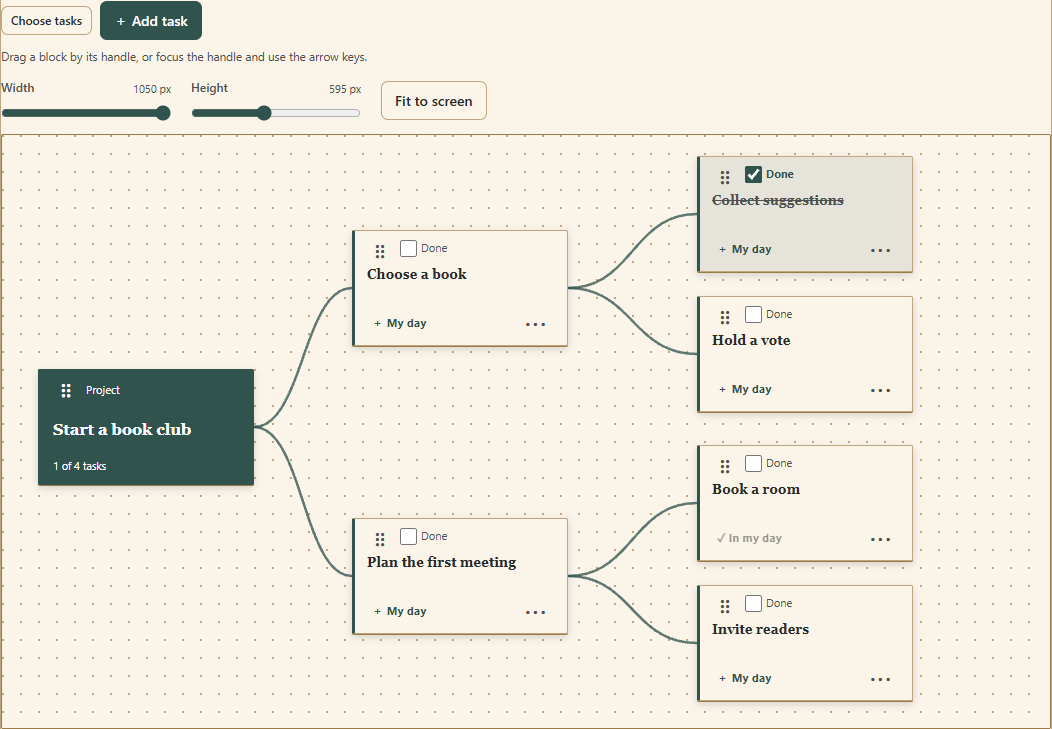
Project mind map
Choose the tasks and subtasks you want on your map, then drag the blocks into place. Check off finished work or add your next step to My Day right from the map.
MORE ROOM FOR WHAT MATTERS
Arrange the blocks on your home screen to suit the way you work. Open a book on the shelf to study, or a project folder to see its tasks. Choose from 12 rooms, from an antique library to a cyberpunk study, or switch to Classic view. When an idea comes to you, dictate it, pause if you need to, then select Finish. You’ll find it in Notes under Ideas and thoughts.
With the Russian interface, Russian speech is recognised on this computer. Dictation in other languages depends on browser support. You can always type your thought.
Choose an active project or an area of study and its subtypes. Read a properly scaled line chart; open archived work separately.
How to use these featuresCreate events in Home, Payments and Meetings, or make your own categories. Set up to five notifications for one event.
How to use these featuresAdd your own photos, wishes and next steps to a personal vision board. Changes save automatically; photos stay on your computer.
How to use these featuresArchive and restore individual tasks and subtasks, or delete a branch you no longer need. Recorded work time stays in your history.
How to use these featuresINSIDE MY DAY 0.4.20
Make room for learning, personal projects and habits you want to keep. Your recorded effort stays visible, one day at a time.
Find a person by @username, send a request and chat after they accept. Keep messages, links and small files close to your plans.
Explore the appBuild a helpful habit or work on leaving one behind. Mark a day or a 12-hour step, move towards a cumulative goal and continue through new levels, stars and badges. A difficult step leaves your earned progress intact.
Explore the appKeep text notes outside your projects. Create a note, save it, put it in a group and return when you need it. Remove notes you no longer want.
Explore the appChoose a study or project task for a 25-minute session, then take a break of your choice. Pick from 16 sounds, adjust volume and duration, and receive an in-app alert, a Windows notification or both. Completion stays in your hands.
Explore the appChoose an active project or an area of study and its subtypes. Read a properly scaled line chart; open archived work separately.
Explore the appBring study and project work into My Day. Move unfinished items to a chosen date and find them in that day’s plan. Keep your next step and the place where you stopped close by.
Explore the appBreak a project into tasks and nested subtasks, add notes and dates, and use the calendar to find planned or overdue work. Keep finishing a task separate from recording its focus time.
Explore the appAt home or on your laptop, you choose the saved version you want to continue with. There is a clear history, showing when and where each copy was sent.
Explore the appReal browser tabs for ChatGPT, research and anything you want to explore. Your own account.
Explore the appChoose a classic dial or a modern face for the clock on My Day.
Explore the appSixteen built-in melodies, sound preview, repeat schedules and a five-minute snooze.
Explore the appCreate events in Home, Payments and Meetings, or make your own categories. Set up to five notifications for one event.
Explore the appAdd your own photos, wishes and next steps to a personal vision board. Changes save automatically; photos stay on your computer.
Explore the appWindows 0.4.20
In your installed app, open “Settings and backups” and check for updates. Download 0.4.20 and confirm the usual Windows installation. No website sign-in or new purchase is needed for a normal update.
GOOGLE CHROME · CHATGPT
Open the real Google Chrome beside your diary. ChatGPT is the home page; normal tabs and the address bar are there for your research, study and everyday browsing.
Chrome must be installed. My Day uses a separate Chrome profile, so you sign in once with your usual method. A paid ChatGPT plan is not included in the My Day licence.

10:10
Try the clock faces · current time on this device
TIME, IN YOUR OWN STYLE
Ten clock faces, from classic to modern. The clock on My Day shows this computer’s current time, and your chosen style is saved.
Choose one of 16 built-in sounds for each alarm and listen before saving. Set a one-off or repeating alarm; snooze for another five minutes when you need them.
Alarms work while the app is running, including when minimized. A powered-off or sleeping computer cannot ring. After sleep, alarms up to 10 minutes late will ring.
YOUR DAY CAN MOVE WITH YOU
At home or on your laptop, you choose the saved version you want to continue with. There is a clear history, showing when and where each copy was sent.
Finish and save your work, then select Send to cloud on the computer with the up-to-date diary.
On your other licensed computer, open the history and check the date, time and source computer.
Confirm loading the version you chose. Before replacing records, the app creates a local safety copy.
Automatic cloud copies can run every three hours when there are changes and the app is running online. Loading a version on another computer stays manual. Each computer needs its own licence.
MY DAY
Your diary is stored locally. Internet is used for licence checks, updates, chat, browser pages and cloud copies. You decide when to send a copy and which saved version to load.
Save and restore a local diary backupReview your day and week from saved resultsCorrect a result and reopen your last completed dayLocal Russian dictation in supported fields. Other dictation languages depend on your browser. Microphone access is your choice.
A CONVERSATION, CLOSE AT HAND
Find someone by their exact @username and keep the conversation beside your day. Share a thought, a useful link or a small file.
Previous days
Add your display name and photo. Find another user by their exact @username.
Send text, HTTPS links and small files up to 2 MiB. Save received files when you need them.
After closing the day, revisit conversations in your personal history and search an earlier day.
Your chat profile (display name and photo), messages and files are stored by the service and accessible to participants and the service operator. Chat is not end-to-end encrypted. Your diary is not shared with the other person.
A SIMPLE WAY IN
Choose a network and receive a private order page.
Send the transfer ID. We check and confirm the payment.
Download the app and add its computer code to your order.
Receive your key on the same page and start your diary.
ONE APP. EVERYTHING INCLUDED.
Study, projects, habits, text notes, focus timers, calendar, statistics and chat. Ten languages and nine themes are included.
Annual licence
30 USDT
The complete application · one computer
30 USDT in TRON (TRC20) or Ethereum (ERC20), plus your wallet’s network fee. One calendar year on one computer. No automatic charge. A second computer needs its own annual licence at the same price; synchronisation is available for the two licensed computers.
MY DAY / Q&A
My Day opens the installed Google Chrome in a panel beside the diary. You sign in to your own ChatGPT account. Its plan, limits and any paid services belong to that account. The diary works without ChatGPT, and your entries are not sent to it automatically.
No. Send a saved copy from the computer with the current diary. On another licensed computer, choose a version by date, time and source and confirm loading it. Automatic copies can upload every three hours while the app is running and there are changes.
The app must be running and the computer awake. Alarms also work when the app window is minimized. A sleeping or powered-off computer cannot ring. After waking, alarms up to ten minutes late will ring.
Create a chat profile, find the other user’s exact @username and send a request. Once accepted, you can exchange text, HTTPS links and files up to 2 MiB. After closing a day, previous conversations remain in your personal history.
A normal Windows application with a shortcut and an uninstaller. Its workspace opens in your browser while the application runs on your computer.
The complete Windows application on one computer for one calendar year from licence issuance. The exact expiry date appears in the app and your order.
We check payment manually. After confirmation, download the app from your private order page, install it and send the computer code. Your key appears on that same page.
Contact us through your order page. A computer change or Windows reinstall requires us to replace your activation. One licence works on one computer.
No. You use the installed Windows application. No ChatGPT account or Google spreadsheet is needed.
Save your private order link for payment status, download, support and your licence. Keep it private.

THE STORY BEHIND MY DAY
I work in financial markets and investing. My life involves a constant flow of information, analysis, projects and learning. There are new materials to study, ideas to keep, things to return to and everyday responsibilities to make time for.
At some point, I realised I needed a comfortable way to organise it all.
I looked at plenty of planners, diaries and note-taking apps. Many came with a huge range of features, settings and their own rules. Before I could simply write down tomorrow’s tasks, I had to work out how the software itself worked. Gradually, I realised it was all too complicated for what I needed.
What I needed was simplicity.
Open an app, capture a thought, plan the day and choose what matters most. Gather learning materials, break a big project into clear steps and calmly pick up where I left off. I wanted to see my commitments in one place and understand what to do next.
So I decided to create an app for myself.
That is how My Day began: as my own working tool. I brought together the things I needed every day — plans, notes, projects, learning materials and reminders. I tried it on my own tasks, noticed what got in the way and gradually improved the app.
I also wanted it to feel pleasant to use. Alongside tasks, there should be room for personal thoughts, small joys and plans that matter to you. A day is about more than work. It includes loved ones, interests, rest and life beyond the to-do list.
Over time, I began to think this approach might help other people too: people who study, work, run their own projects or simply want a little more order and calm in everyday life.
And I decided to share what I had created for myself.
For me, My Day is a way to clear my head, see what matters and make time for the things that truly count.
Igor MaslovCreator of My Day

Keep your plans close. Let the rest of your day be yours.