Check the time zone of an online-course deadline
Keep the original time, its zone and the checked local deadline.
“Submit by evening” may refer to the platform's time. Find the exact deadline and zone. UTC is a common time reference; an offset is the difference from it, not the task's duration.
What to do
- Read the official course instructions and keep the date, time and zone label rather than guessing from the time displayed on your own screen.
- Check your applicable offset on the deadline date, convert the time and separately confirm the calendar date if the conversion crosses midnight.
- Record original and local deadlines together, allow time for submission and check afterwards that the platform has actually received your work.
Example
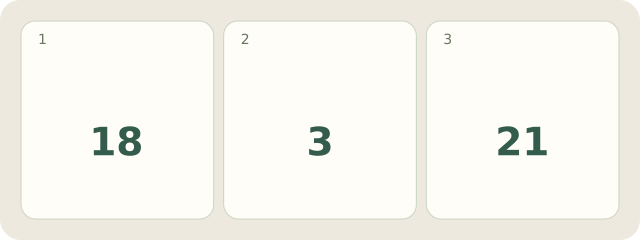
Fictional example: the deadline is 18:00 UTC. With the applicable offset +03:00, it is 21:00 on the same date: 18 plus 3 equals 21.
My Day · Windows
In My Day, record a task date and time-zone note; this does not assume automatic conversion of course deadlines.