MEET THE INDICATOR
The meaning behind the numbers.
SW Sequential is an independently developed implementation of the approach to price sequences described in Tom DeMark's work. The indicator compares bars according to the selected rules, marks the stages of a move and helps you organise your market observations. It does not replace the chart with a ready-made decision: you see price itself and how the count develops.
- Ready-made calculation profiles
- 9, 13 and 9‑13‑9 labels
- Histograms and a timeframe table
- Adjustable colours, labels and lines
What 9 and 13 mean
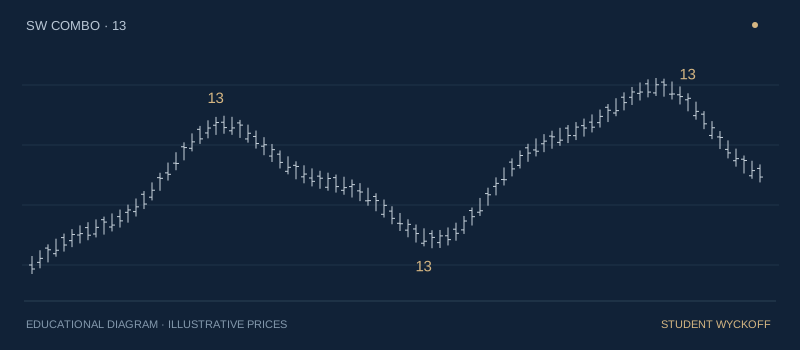
The first stage is called Setup — an initial sequence of price comparisons. When it completes according to the rules of the selected profile, a 9 appears on the chart. After a qualifying sequence, Countdown may develop — the next counting stage, up to 13. Its conditions are different, so qualifying bars do not have to be consecutive. A pause between numbers does not in itself indicate an error.
Nine marks the completion of the first stage. Thirteen marks the completion of the next. Neither label means that price must reverse on the following bar. The move may continue after the count is complete, which makes the label's position, price behaviour and nearby levels relevant.
How to read the labels
Start with the “9 and 13 only” display: it hides intermediate numbers so that you can see completed sequences. Then enable the full count if needed to follow which bars were counted. Labels in opposite directions reflect different conditions; Buy and Sell identify the direction of the calculation, not an instruction to buy or sell.
The 9‑13‑9 sequence marks an additional stage after a completed count. It appears where the corresponding rules of the selected profile have been met. P marks an additional Setup completion condition. These elements can be studied separately without cluttering the main chart.
Ready-made profiles and personal settings
Ready-made calculation profiles group related rules so that you do not have to assemble them individually. The current version includes historical DeMark variants, Perl variants and a manual mode. The profile determines the calculation; the display preset determines which results you see. Changing the display should not be understood as changing the method.
Additional settings include Standard and Aggressive, cancellation and recounting rules, and TDST, Reference and Risk levels. Risk is a calculated reference for assessing the situation, not a stop order automatically placed in a trading terminal. A set of rules modified manually should be treated as your own configuration.
When you need a more detailed view
Histograms show the state of the count in a separate pane below price. The table for other timeframes lets you compare the current situation across several timeframes. For an uncluttered workspace, you can hide tables and additional lines, keeping only the labels you need.
Visual settings let you change colours, sizes and the spacing between labels, and style directions and lines separately. If several events fall within the same area, placement settings help you read them without overlapping.
How to get started
Once access has been confirmed, open TradingView with the username in your request and add the indicator provided. Choose an instrument and timeframe, and start with the ready-made DeMark 1997 profile and a simple 9/13 display. Review several completed sections before adding further conditions.
To receive alerts, you need to create an alert separately in TradingView. Its operation and the available depth of history also depend on the platform itself and your plan. The indicator calculates the history available to it; the number of older objects drawn is limited by TradingView's capabilities.
What you receive
Access to the indicator in your TradingView account for your chosen subscription period, calculation and display settings, and email support. Source code is not included in the subscription. You need your own TradingView account; any TradingView features or paid plan required for your chosen way of working are paid for separately.
The STUDENT WYCKOFF implementation is inspired by Tom DeMark's published work. Historical profile names identify the basis of the rules. This is an independently developed product.